Can Bonsai 27B (1-bit) run on MacBook Air M3 16GB?
What this means
Bonsai 27B (1-bit) fits on the MacBook Air M3 · 16GB at Q1_0. We estimate it uses 5GB of the conservative 13GB working budget.
Estimated decode speed is 11.1–15.3 tokens/s. A roughly 300-word answer may take around 30 seconds.
See how fast it feels
Using the midpoint of our 11.1–15.3 tokens/s estimate for this demo.
Where the memory goes
| Component | Detail | GB |
|---|---|---|
| Model weights | Q1_0 GGUF (3.8 GB) + mmap overhead | 4 |
| KV cache | 4K context window | 0.3 |
| Runtime | macOS inference app + compute buffers | 0.8 |
| Total needed | at Q1_0, 4K context | 5 |
| Working budget | 16 GB unified memory − conservative macOS reserve | 13 |
| Headroom | remaining inside the working budget | 8 |
Pick your quant
| Quant | Download | Memory | Estimated speed | Verdict |
|---|---|---|---|---|
| Q1_0 ★ | 3.8 GB | 5 GB | ~11.1–15.3 tok/s | ✓ Runs great |
Get it running on this Mac
Recommended app: Locally AI. Follow the point-and-click steps below.
Install the app and open it. The current listing requires macOS 26. If the App Store says this Mac or macOS version is unsupported, do not sideload it; choose a smaller ordinary GGUF model and follow its LM Studio walkthrough instead. No account or Terminal is required.
Open in the Mac App StoreDownload Locally AIFree · no account required
Choose the curated Bonsai 27B entry. Locally AI may hide it on Macs that the app considers unsupported; if it is not listed, choose a smaller model rather than forcing a manual download.
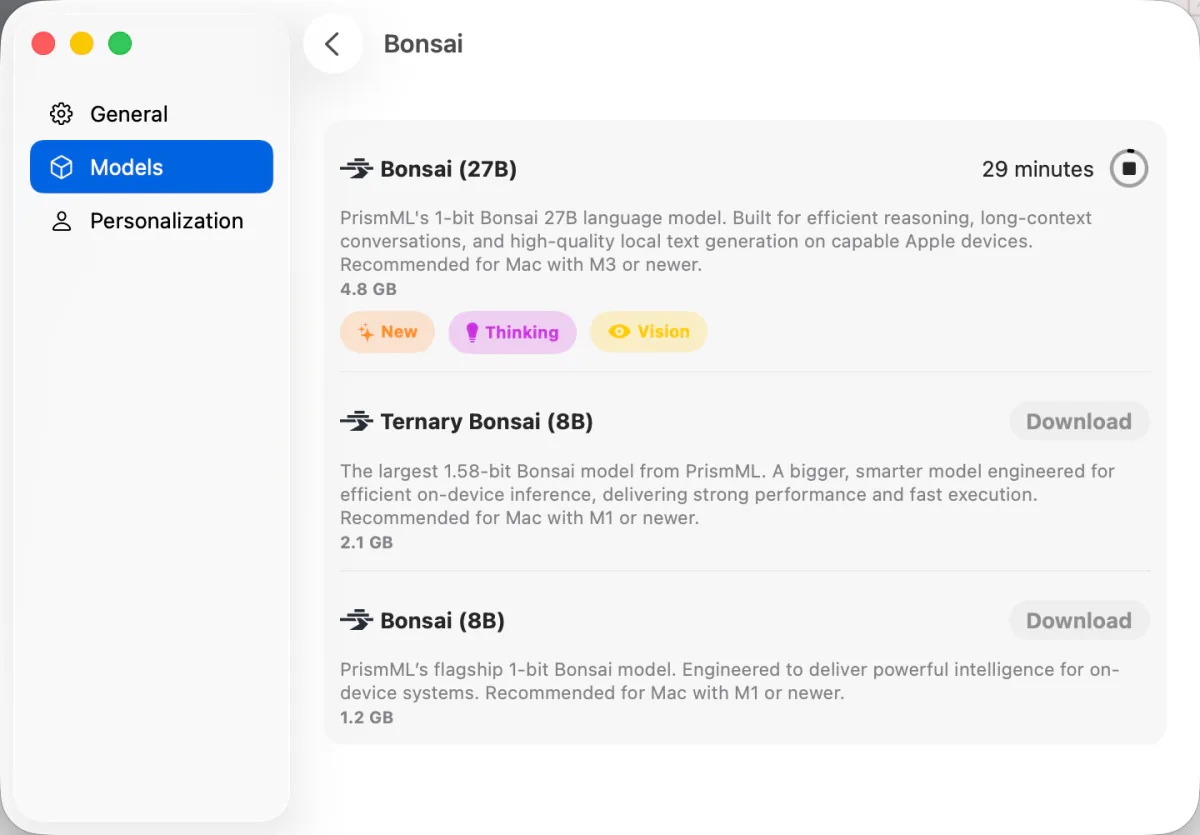
Keep the Mac awake and leave enough free storage. The app selects its own Apple-optimized build, so you do not need to choose Q1_0 yourself.
Try “Explain why the sky is blue in three sentences.” Close memory-heavy apps if loading stalls.
Turn off Wi-Fi after the first reply and ask another question. If it still answers, the model is running locally.
The memory and speed numbers above describe the tracked Q1_0 GGUF. Locally AI does not publish the exact internal build in its listing, so treat the speed range as guidance, not an app-specific benchmark.
This model is already in Locally AI’s curated Apple catalog, so it removes the repository, file, quant, and runtime choices from the first chat.
People who specifically need the tracked GGUF rather than the curated app build.
Use a current llama.cpp only if you are comfortable with an advanced setup; GUI apps can bundle an older backend.Ordinary GGUF models with a repository and quant you can select directly.
Special 1-bit support depends on the backend version bundled with the app.- Model not listed: the app may hide Bonsai 27B on unsupported Macs; choose a smaller listed model.
- Download stalls: confirm there is enough free storage, reconnect to Wi-Fi, and restart the download inside the app.
- Load fails or the app closes: quit memory-heavy apps. Confirm the curated Bonsai model is still selected. Otherwise use a smaller model from this Mac's results.
- No reply while offline: make sure the downloaded local model—not a remote or cloud model—is selected in the chat.
Your anonymous feedback helps us prioritize which Mac and model paths to retest.
Other models on this Mac
Bonsai 27B (1-bit) on other MacBook Air M3 configurations
FAQ
Can the MacBook Air M3 · 16GB run Bonsai 27B (1-bit)?
Yes at Q1_0. We estimate about 5GB of working memory and 11.1–15.3 tokens/s at 4K context.
Which Bonsai 27B (1-bit) quant should I use on this Mac?
Q1_0. It is a 3.8GB download and leaves about 8GB inside our conservative working budget.
Which app should I use for Bonsai 27B (1-bit) on this Mac?
Start with Locally AI. This page gives the complete point-and-click walkthrough.
Are these speeds measured on a MacBook Air M3?
No. The range is a formula estimate based on memory bandwidth, model size, active parameters, cooling, and a 4K context. The app, backend, thermals, and prompt can change real performance.