DeepSeek Harness Has 4 Modes. Which One Should You Use?
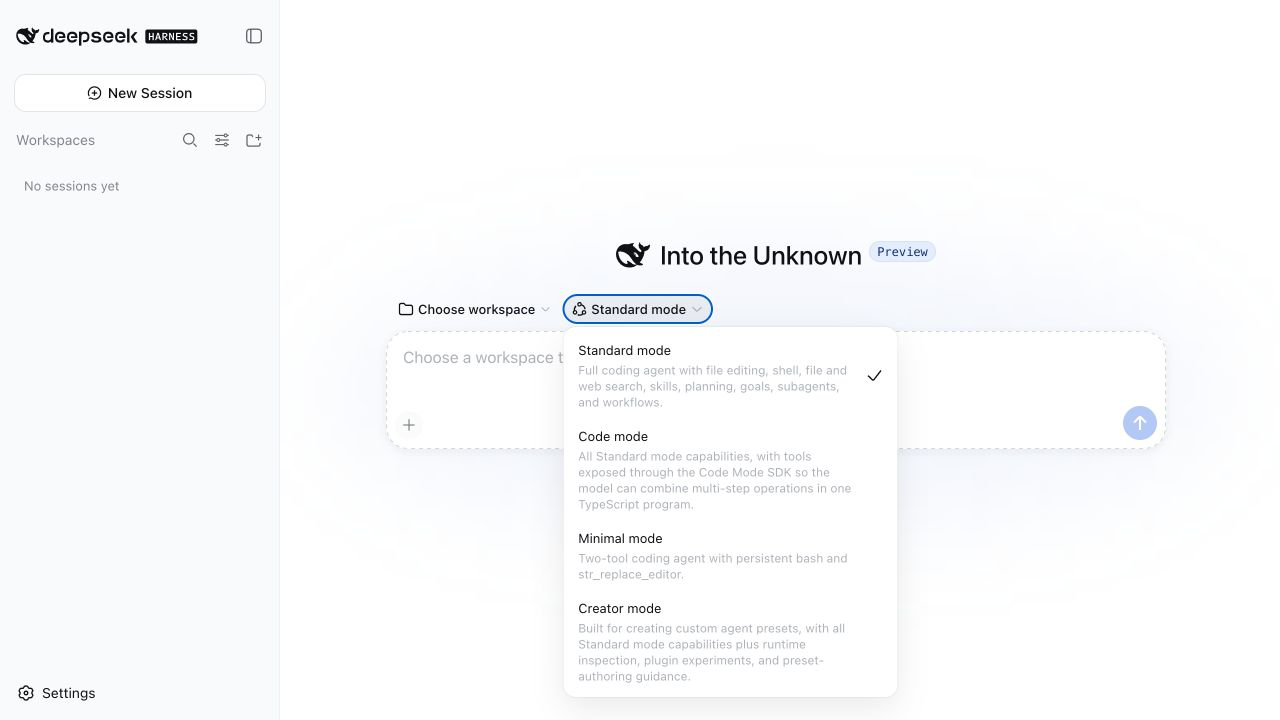
When DeepSeek open-sourced Harness, I spent most of an evening trying to understand one button above its prompt box.
It opened a menu with four choices: Standard, Code, Minimal, and Creator.
Honestly, my first reaction was that this was pretty unfriendly. Codex's reasoning-effort menu already gives people several levels to think about, but at least those labels run in one direction: more or less reasoning. DeepSeek gave me four names that sounded like internal architecture and asked me to choose one before I had even typed the job.
It felt like driving an automatic for years, then being handed a manual car with four unfamiliar gears.
“Pick the right one for the road.”
Fine. How am I supposed to know which road needs which gear?
Our broader DeepSeek Harness vs Codex and Claude Code article explains what kind of product Harness is and where it fits. Here I want to stay with the question that kept bothering me that night. Once the prompt box is open, which mode should I actually choose?
This is the real screen that sent me down the rabbit hole.
I read through the source and tried several explanations. The one that finally worked was simple.
Imagine you need to walk somewhere.
You do not need to understand Cordis, ReAct, tool registries, or agent loops yet. Just think about how you would find the way. These are not four levels of intelligence. DeepSeek is changing the instructions, tools, and built-in help around the model.
01. Standard keeps the map open
Standard is the easiest one because it already feels familiar.
You are walking through a city you do not know, so you keep the map open. You walk for a while and check your position. At the next junction, you check again. If a road is closed, you see it and change direction.
The rhythm looks like this:
act → see what happened → decide again
That is how most of us already experience a coding agent. It edits a file, reads the result, runs a command, looks at the error, and decides what comes next.
DeepSeek's Standard preset comes with the full setup: file editing, shell commands, search, planning, skills, subagents, and workflows.
Its biggest advantage is boring and valuable. It gets many chances to notice that it is wrong.
That feedback has a cost. After every tool step, the result comes back to the model and it has to think again. A clean Code mode program can handle several steps together and return only what matters. Standard spends more time to buy more chances to catch a mistake.
If you just want to get work done and do not want a lesson in agent architecture, choose Standard. I still think DeepSeek should make that decision feel much more obvious in the UI.
02. Code mode programs part of the route
The Chinese interface calls this PTC mode. The English interface calls it Code mode. They are the same preset.
My first picture of PTC was this. Look at the map before leaving, remember the next few turns, put the phone away, and walk the whole stretch without checking again.
That picture gets you halfway there.
The program is not blind. It can read a tool result, take a different branch, retry after a failure, or run several independent searches in parallel. A better picture is a small navigation program that can read the road signs for itself.
Code mode gives the model the same broad capabilities as Standard. DeepSeek shows it how to call each tool from TypeScript. The model then writes a short program that calls several tools and combines their results.
The model sees what the program prints or returns. Intermediate results can stay inside the program. Ten searches can be filtered down to one useful summary before the conversation has to carry them.
When the route is clear, this can be a very good trade. The agent spends less time reopening the map.
The bet happens at the beginning. The model has to understand the available tool calls and write a sound program. DeepSeek does not promise that this always saves time or tokens. There is no automatic undo either. If the program edits a file and fails three steps later, the earlier edit remains.
This is how I remember the difference now.
Standard pays for repeated chances to correct itself. Code mode bets that enough of the route can be expressed in advance.
Where Workflow fits
Workflow helped me complete the picture because everyone knows what a daily commute feels like.
You have taken the same route hundreds of times. You know the turn, the crossing, and the station entrance. Opening a map every morning would be a waste.
The metaphor is a little looser here. In Harness, Workflow lives inside Standard and Code, so it is a tool rather than a fifth preset. For a requested workflow or a large multi-agent job, the model writes a JavaScript program, sends pieces of the job to several agents, and gathers the results.
I keep the commute picture as a memory aid. The actual program may be written for a one-off trip, but the instinct is similar: once enough of the route is known, there is no need to reason through every turn separately.
03. Minimal takes the navigation away
Minimal is the preset that made me stop thinking like a normal product user.
DeepSeek gives the model a destination, then removes most of the help. The preset has a fixed prompt and exactly two tools:
- a persistent shell
- a text editor
That is all.
Of course, a shell is not a small tool. It can inspect files, run tests, search a repository, and launch other programs. Minimal replaces a rack of specialized controls with one very broad control and an editor.
The question behind it is more interesting than the feature list.
How much harness does a capable model still need?
I think of it as a training-wheels experiment. Take the extra support off and see whether the model can still ride. Fewer tools do not automatically make the agent faster, safer, or easier to use. More responsibility moves to the model, and more risk moves to the person supervising its shell.
I would not choose Minimal for ordinary daily coding. As an experiment, I find it fascinating. DeepSeek put a research question directly into the product menu.
04. Creator opens Minecraft
The navigation metaphor finally breaks at Creator.
Minecraft works better.
The first three modes still assume that the road and the tools already exist. Creator opens the workbench.
If there is no useful road, Creator can lay one. If the tool is missing, it can build that too, then return to the original job.
Creator starts from Standard, then opens the machine itself. It can inspect the running Harness, try a temporary plugin, and create a custom preset.
The model's weights stay untouched. Creator changes the software and tools around the model. That boundary matters because “self-improving agent” is an easy phrase to overuse here.
It is also powerful enough to deserve caution. DeepSeek says the runtime toolset should be treated like shell access.
Creator is the mode I would show to someone building an agent system. I would hide it from someone who only wants help fixing a bug. To me, it is the most ambitious part of the design.
The pictures I keep in my head
After one night, this is the version I can remember without reopening the documentation.
| Setup | Picture in my head | What changes |
|---|---|---|
| Workflow | The commute you already know | One requested multi-agent job follows an explicit program |
| Code | A navigation program handles several turns | Tool steps move into TypeScript |
| Standard | Walk with the map open | The model sees results and decides again |
| Minimal | Keep the destination, lose most of the navigation | Only a persistent shell and editor remain |
| Creator | Open Minecraft and build what is missing | Runtime inspection and preset-building tools are added |
Workflow sits in the table for comparison. It is still a tool inside Standard and Code, not another preset.
There is one correction to my original gear analogy. These choices do not form a ladder from weak to strong. Standard is the full baseline. Code presents its tools through a program, Minimal removes most of the scaffolding, and Creator adds tools for changing the setup itself.

Then I opened the Trajectory tab
The dropdown tells you what can change. The Trajectory tab shows what DeepSeek chose to make inspectable.
It is much more revealing than a normal activity log. The interface lays out the initial system prompt, the user's request, injected context, model requests, assistant messages, and any tool calls and results. It also plots time spent on input, the model, and tools across the top.
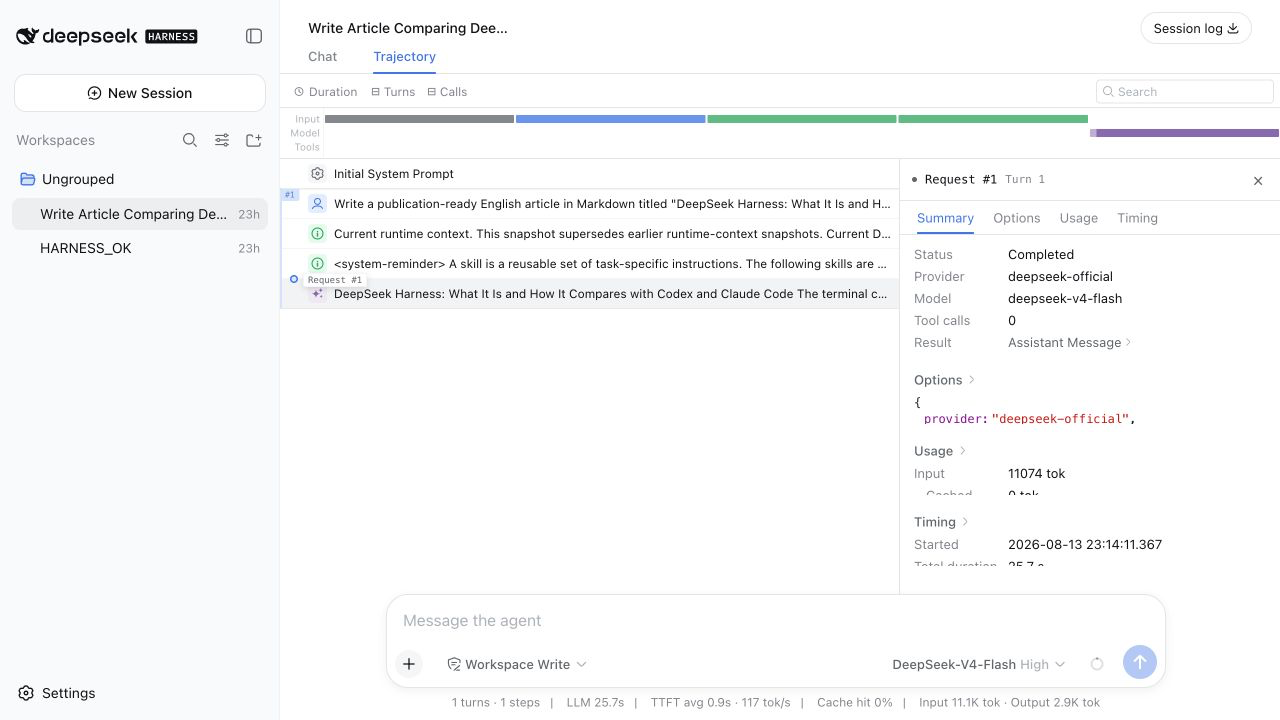
One distinction matters. Harness stores a richer session record locally. Full-session telemetry is a separate option and is disabled by default, so this screen alone does not show that every local event is uploaded.
When Harness calls DeepSeek's hosted API, the request leaves the machine. It contains whatever the model can see at that point. The request body can include the prompt and history, system instructions, tool schemas, and any tool results added back into later context. Official DeepSeek requests also carry a stable anonymous user ID and the session ID in HTTP headers. The model does not see those headers, but the receiving system can use them to correlate requests from the same user and session.
The API call itself is ordinary. Any client calling DeepSeek's hosted API sends model-visible input. Harness contributes the structure around it. It does not send a neat mode: standard field, but the preset still changes the request by changing the instructions and tools. Harness shapes the model-visible sequence, and the hosted API receives it one request at a time.
The four modes shape the data DeepSeek sees
Once I saw the Trajectory view, the awkward menu looked different to me.
The developer's menu choice decides which instructions and tools will shape the run. Every task supplies a new scenario, and each result that re-enters the model's context extends that mode-shaped record.
Standard produces a record full of short decisions and fresh feedback. Code produces a more pre-planned sequence. Minimal tests what happens when most of the scaffolding disappears. Creator records what the model does when the environment itself can be changed.
The same task can produce a very different record in each mode. Across linked requests, that record can preserve the working method. It shows what the model was asked to do, which tools it could use, what came back, and how the next step changed. A plain prompt-and-answer pair loses most of that structure.
Here is the part I cannot establish. DeepSeek has not said that every Harness sequence is retained or used for training. Its public policies do leave room to use de-identified Inputs and Outputs to improve its services and underlying technology, with an opt-out. Its training disclosure also says a small portion of optimization-training question-and-answer data may be based on user input.
For a model lab, a structured record of task, strategy, actions, tool outcomes, recovery, and result would be far more useful than a loose pile of prompts and answers. That is why I think the format matters.
Harness is a coding tool today. I can imagine the same control problem appearing in data analysis, slide creation, and other office work, then in AI for Science, autonomous systems, embodied AI, and healthcare. Different domains will need different tools and safety boundaries. They still share the same hard question: when should an agent follow a known procedure, keep checking its surroundings, work with less scaffolding, or build something new?
That is my extrapolation, not a roadmap DeepSeek has published.
Liang's priorities
Across public interviews with Liang Wenfeng (DeepSeek CEO) and the investor discussion that circulated in July 2026, the priorities are remarkably consistent. Liang puts AGI research ahead of short-term commercialization. Coding agents matter because code gives models useful work with outcomes that can be checked. Continual learning comes next, with DeepSeek's models first helping the lab build their successors.
This makes my reading of Harness straightforward. The four presets turn different working strategies into explicit choices. When a developer uses DeepSeek's hosted model, each choice produces a linked sequence of model-visible decisions and outcomes. The Trajectory view shows the same structure from the user's side.
I think this is the real strategic value of Harness. It turns strategy selection into structured trajectory data. Each hosted run gives DeepSeek another example of how a developer approached a task and what happened next. That is the kind of data a future model needs to choose the working strategy for itself.
Auto is the real destination
The four visible presets naturally suggest a fifth one.
Auto.
My imagined Auto would start an uncertain coding task in Standard. When it sees a predictable block of tool work, it could move that block into Code. A route that has become routine could use Workflow. Minimal would remain useful for controlled experiments. Creator would open only when the task genuinely requires a new tool or setup, ideally with the user's permission.
If a Code plan goes wrong, Auto could return to Standard and buy more feedback.
None of this exists in Harness today. In the version I checked, a session can change presets only while it is blank. Once it has produced work, the choice locks.
Today the developer chooses a working method, and the trajectory records what follows. The next question is whether a model can learn the connection between the two.
I began the evening wanting DeepSeek to hide the gearbox. Now I think the awkward menu is the point. It exposes a choice the model cannot yet make reliably for itself.
Today the developer chooses the mode. Auto would mean a future model has learned, from trajectories like these, when to choose for itself.
Sources on Liang Wenfeng's priorities
FAQ
What are the four DeepSeek Harness modes?
Standard is the full coding setup. Code coordinates several tool steps in a TypeScript program. Minimal keeps only a persistent shell and editor. Creator adds tools for inspecting and building agent presets.
Are PTC mode and Code mode the same thing?
Yes. The English interface calls it Code mode, while the Chinese interface calls it PTC mode. Both names refer to the same preset.
Is DeepSeek Harness Code mode always faster or cheaper?
No. It may reduce model round trips and keep intermediate tool results out of the conversation, but the model still has to write the program. DeepSeek makes no universal speed or token-saving promise.
Which DeepSeek Harness mode should I use?
Start with Standard for everyday coding. Use Code when a predictable sequence can run as one program, Minimal when you deliberately want only a shell and editor, and Creator when you are building or testing a custom Harness setup.
Can DeepSeek Harness switch modes automatically?
Not as a task-aware Auto feature today. A blank session can change presets, but the preset locks after that session has produced work. Auto is an idea explored in this article, not a shipped feature.
Does DeepSeek Harness upload every trajectory to DeepSeek?
No. Full-session telemetry is a separate optional channel and is disabled by default. When you use DeepSeek's hosted provider, each model call still sends the model-visible prompt, history, system instructions, tool schemas, and any tool results that have entered the next step, together with anonymous user and session identifiers in HTTP headers.